

What is MCP?
The Model Context Protocol (MCP) is an open standard that enables AI applications to securely connect with external data sources and tools. MCP is supported by various AI tools including Claude Desktop, Cursor, VS Code, and other AI development environments. For detailed information about MCP, see:Getting Started
MCP works out of the box — no workspace configuration needed. Just add the server to your AI client and authenticate:Client Setup
Use the MCP server URL for your region:- Claude Code
- Claude Desktop / claude.ai
- Cursor
- VS Code
- Codex CLI
- Gemini CLI
- Other Clients
Run the command for your region:
Authentication
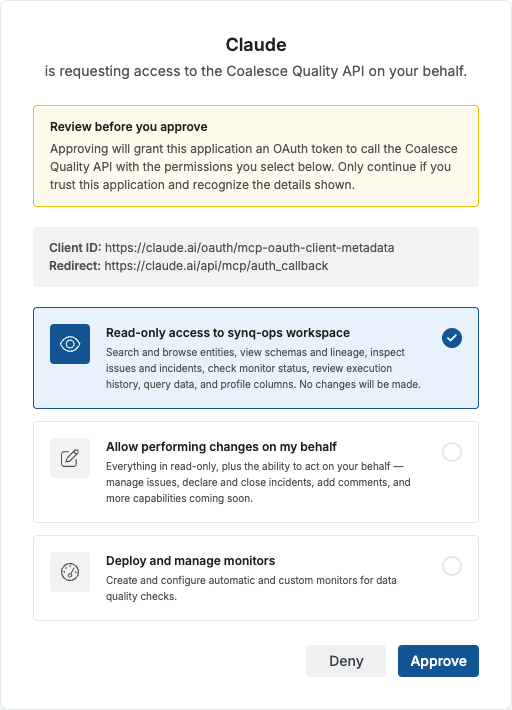
Coalesce Quality MCP uses OAuth2 with PKCE for secure authentication. This is the recommended way to connect — no API keys or tokens need to be pasted anywhere, and every action the AI takes is attributed to you, with a via MCP badge on the actor chip so it’s clear the change came from an AI assistant rather than the app. The flow is fully automatic:- When your AI client connects for the first time, your browser will open automatically
- If you are already logged in to Coalesce Quality, the consent screen appears directly. Otherwise, you will be asked to log in first.
- Select the permission level you want to grant (see Permissions below)
- Click Approve to authorize
Static tokens (legacy)
Long-lived workspace tokens (prefixedst-…) created under Settings → API still work with the MCP server — pass one as a Bearer token in the Authorization header of the MCP connection. Use this only when OAuth is not an option (for example, headless automation without a real user, or when user API access is disabled for the workspace).
We recommend OAuth for all interactive AI clients: actions are attributed to the real user rather than to a shared service identity, tokens can be revoked per-user, and the scopes granted match what that user’s role already allows.
Permissions
During authorization, you choose what level of access to grant. The available permission scopes on the consent screen are determined by your user role in the workspace — you will only see options that your role allows.A permission grants what the application asked for within it, not every capability listed above. The consent screen shows those permissions grouped by tier — read them before approving, and untick any group you would rather withhold. An application that asks for nothing in particular is offered the whole tier instead, so grant the narrowest one that covers what you want the assistant to do.
Disabling User API Access
Workspace admins can prevent users from authorizing third-party applications (including MCP clients) to access the Coalesce Quality API via OAuth. The toggle lives in Settings → Workspace and can be flipped on or off at any time by a user with the admin role — individual users do not need to take any action when the setting changes.
- New OAuth consent attempts from MCP clients are rejected with an explanatory message on the consent screen.
- Existing OAuth tokens issued to users stop working.
- Workspace-provisioned long-lived tokens (
st-…) and client credentials continue to work — use those if you need programmatic access in this mode.
Coalesce Quality MCP Tools
Once connected, your AI assistant has access to a wide range of tools for working with your data infrastructure. The tables below group them by purpose.Session and Identity
Discovery and Search
Core Entity Operations
Folder Navigation
Browse the catalog’s folder / containment hierarchy — the roots data hangs from, the sub-folders under any folder, the folder(s) an entity lives in, and the entities inside a folder. Read-only; membership is shallow by default (one level per browse, direct members only) — setdeep=true or browse sub-folders in turn to recurse. Use these to discover the real folder ids that ResolverQL’s in_folder(...) operand needs.
Data Lineage Analysis
The same graph the lineage view draws, including column-level lineage where the warehouse supports it. Comprehensive Lineage
Upstream Analysis
Downstream Analysis
Cross-Entity Analysis
Orchestration
Issue and Incident Management
The read side of the workflow Incidents describes. The tools that change an issue or an incident are under Write Actions.Impact Analysis
Data Quality and Monitoring
The read side of a workspace’s checks. Monitors overview covers the monitor types and SQL tests the tests; creating and changing them is under Managing Monitors and Tests.Executions
SQL Generation for Data Analysis
These tools generate the SQL that Coalesce Quality would run to analyse data, but the MCP server does not execute queries against your warehouse. The response includes the full
executedSql — run it yourself (or let your AI client run it through a separate warehouse connection) to get actual results. This keeps your data inside your own warehouse and avoids giving the MCP server any standing database credentials.Change Tracking and History
Database Changes
Git Integration
Workspace Setup
What needs attention in how the workspace is set up: the changes Coalesce Quality recommends, such as a grant an integration’s role is missing or a setting that stopped matching what runs, and the integrations that are failing.
Deciding about a recommendation on an integration also needs permission to edit integrations.
Write Actions
The tools in this section modify workspace data and require Write access (for issue/incident actions) during OAuth consent. If the user granted only read-only access, these tools will not appear in the client.
Managing Monitors and Tests
These tools create and change data quality checks — monitors, table-stats monitors, and SQL tests all require Deploy access. Start with
describe_check_types (available without any granted scope) to pick the right check type for a goal. Setting up monitors and SQL tests describe the same checks as the app builds them; defining monitors in code is the third way, for checks you want under version control.Two safeguards apply to every write here:- Full replace, not patch.
update_*tools replace the whole object — fetch the current definition with the matchinglist_*tool, apply your edits, and send the complete object. Omitted fields are cleared. - Confirmation-gated changes. A change that would reset a check’s baseline (retrain anomaly detection / re-run a test) or overwrite a check owned by the app UI or a YAML config is not applied on the first call. The tool reports what needs approval; re-call only after the user explicitly confirms. The assistant never self-confirms.
Deployment Rules
Deployment rules deploy monitors automatically to every asset matching a ResolverQL selection query, rather than to a fixed list of paths — the same rules Setting up deployment rules describes in the app. All of these tools — listing, previewing, deploying, and deleting rules — require Deploy access. Call
describe_resolver_ql for the query grammar, preview_deployment_rule to see the exact impact, and only then deploy_deployment_rule — the deploy and delete tools are confirmation-gated and never self-confirmed.Monitoring Exclusions
Turn automatic monitoring off, or back on, for specific assets while the deployment rules that select them stay as they are. Each asset gets its own exclusion, which wins over every rule selecting it, so a noisy table can be silenced without editing a broad rule that may own hundreds of monitors.All three tools need Deploy access. They accept the same asset spellings as the check tools: an entity path, or a dotted
database.schema.table.Excluding is safe to repeat. Adding one more table leaves the existing exclusions untouched, and assets that were already excluded come back in their own list.exclude_from_monitoring and unexclude_from_monitoring are confirmation-gated. The first call applies nothing and lists the assets whose monitoring would change; the assistant re-calls only after the user approves, and never confirms on its own. Lifting an exclusion created in the app or by a YAML config takes a second, separate overwrite confirmation.To check the result, call list_monitoring_exclusions with the asset paths. The monitor counts on deployment rules stay the same when an exclusion lands, so they tell you nothing here.SQL Test Deployment Rules
The same query-based deployment, applied to SQL tests: a rule carries a set of tests, a ResolverQL selection, a schedule and a severity, and deploys those tests onto every table or view the selection matches — including tables that only start matching later. SQL tests covers the tests themselves.Reading the rules needs Read-only access — unlike the monitor rules above, listing and previewing these does not take Deploy. Deploying and deleting do. The write pair is gated exactly as the monitor rules are: preview, surface the impact, and re-call with confirmation once the user approves. Overwriting a rule authored in the app or by a YAML config takes a second, separate confirmation.Two things decide which rule a call addresses and what it deploys:
- The title is the identity. A spec reusing a live rule’s title updates that rule; a new title mints a new one. Pass an existing id only to rename a rule, or to edit one under a YAML config’s namespace — and pass the same id to preview and to deploy, or the two calls address different rules.
- A test naming a column the matched table does not have fails on that table. Select on the column (
with_columns("email")) rather than deploying broadly. Views match as readily as tables, since a SQL test is a plainSELECT— restrict withwith_type("table")when you mean tables only.
Check Categorisation
Every check carries one category per dimension — governance (what the check is for: completeness, accuracy, timeliness) and technical (what it does mechanically: nullness, uniqueness, freshness). The category comes from a per-check override, from the producer that declared it, or from a categorisation rule, in that order of precedence. Check categories describes the feature itself; these tools drive the same rules and overrides the Health → Check categorisation screens do.Start with
describe_check_categorisation (available without any granted scope) for the resolution order, the matcher grammar, and the authoring loop. Reading categories and rules needs Read-only access; the three writes need Governance access — a rule applies to every check matching it today and every check ingested afterwards, the same blast radius as restructuring the catalog.A rule’s matcher is the same predicate the app builds: either a structured predicate over the check’s platform, asset type, package, kind, name patterns and annotations, or a CEL expression, never both.The writes are confirmation-gated: the first call reports the impact and applies nothing, and the assistant never self-confirms. A save that would move checks off the category they already carry, or an override that replaces one somebody else set, needs a second explicit overwrite confirmation. Global rules cannot be edited or deleted — every workspace rule is tried before every global rule whatever the priorities are, so the way to change what one does is a workspace rule that matches.Data Products
Data products are named, owned groupings of assets defined by a membership query (authored as ResolverQL, viadescribe_resolver_ql) or pinned asset ids. Data products overview describes what they are for.
The
save_data_product and delete_data_product tools require Governance access during OAuth consent. They are confirmation-gated: the first call reports what would change and never self-confirms — re-call only after the user approves. A product managed by an external source (e.g. Atlan) additionally requires an explicit overwrite confirmation.Domains
Domains are named areas of ownership that group the assets, data products and sub-domains belonging to one part of the business — see Domains. They nest: a domain can sit under a parent, and a parent’s membership includes everything its sub-domains contain. Walk the hierarchy withlist_domains — omit parent_id for every domain at any level, pass a domain id for that domain’s direct children, or pass an empty string for top-level domains only.
Membership is a list of parts combined with OR: a pinned asset, a whole data product, a whole other domain, or a ResolverQL selection query. Unlike a data product, a domain is not a leaf — it can reference other domains and data products, and membership is resolved recursively. A write that would make those references form a loop is rejected and names the offending path.
The
save_domain and delete_domain tools require Governance access during OAuth consent. They are confirmation-gated: the first call reports what would change and never self-confirms — re-call only after the user approves. A domain managed by an external source (e.g. Atlan) additionally requires an explicit overwrite confirmation.delete_domain reports how many direct sub-domains the domain has before anything is deleted, because the two delete modes differ: a soft delete leaves those sub-domains in place, parented to a deleted domain, while a purge is refused while any of them still exist.Owners and Ownership
Owners are named responsible parties with notification channels (contacts); ownerships assign assets to an owner and configure the alerts routed there. This is the “alert routing as code” surface — Ownership overview and Routing alerts describe the same model in the app.The
save_owner and delete_owner tools require Governance access. save_owner is a single use-case call that upserts the owner and its ownerships together. Both are confirmation-gated and never self-confirmed; overwriting an external-source (e.g. Atlan) owner requires an explicit overwrite confirmation.Alerts
Alerts are named rules that send a notification to a set of targets (Slack or Microsoft Teams channels, email recipients, an owner, a webhook) when something happens. An alert is one of three kinds: issues on the selected assets, schema changes on the selected assets, or incident state changes. Assets are selected with a ResolverQL query. Setting up alerts describes the same alerts in the app.Reading alerts needs Read-only access; the four writes need Write access. All four writes are confirmation-gated: the first call changes nothing and reports what would happen, and the assistant re-calls only after the user approves, never confirming on its own.
save_alert is a patch on update: a field you set is written, a field you leave out stays as it is, and targets replaces the whole list. Without an id, the alert’s fqn is the key, so a repeated call updates the same alert rather than creating a second one. The kind of an alert cannot change.Coverage
Data products and owners both answer “who is this for” and “who is responsible”, and coverage is the question of how much of the catalog they actually reach. These three read tools answer it without enumerating every product and every owner first: what claims one asset, how much of a selection is claimed, and which assets are not.Start with
get_coverage_summary. It takes up to twenty named selections in one call, lists nothing, and answers most coverage questions outright. Reach for list_entity_coverage only to name specific assets — and when the gap is large, narrow the selection rather than paging it. A selection per schema, folder or asset type tells you where the gap sits; a thousand rows of asset ids does not.Choose the candidate types deliberately — they decide whether the answer means anything. Data products group what is delivered, so a product-coverage question asks about tables, views and models; left unrestricted the answer is mostly monitors, tests and recon cases, which belong to no product by design. Owner coverage is the opposite: a check usually should have somebody responsible, so include those types when asking about owners.
A few things worth knowing when reading the numbers back:
- The counts overlap rather than partition. An asset in a product and with an owner is counted under in-a-product, under has-an-owner, and under both. Only “claimed by nothing” is disjoint from the rest.
- Selections overlap too, so never add rows together for a workspace total. A workspace-wide selection beside the per-type breakdowns inside it is the recommended shape, and summing those rows counts the same asset several times. Ask for the total as its own selection.
- Membership is recomputed periodically, and every answer says when.
members_computed_atis the start of the most recent successful recomputation pass, so it stops advancing as soon as that recomputation stops succeeding — quote it beside any finding. Ask for live freshness when the answer has to reflect a change made moments ago; it is exact as of the call and costs more, because it re-resolves the whole catalog rather than the selection. - Membership follows identity. Where one table appears twice in the catalog — a transformation model and the warehouse table it builds — an overlay matching one claims the other, so ask about whichever representation you have.
get_entity_overlaysreports back on whatever ids you give it. An id that names no entity comes back claimed by nothing, exactly like a real asset nobody owns. If the ids were assembled by hand rather than taken from another tool’s response, confirm them withbatch_entity_detailsbefore reporting a gap.
Usage and Popularity
These tools read your data platforms’ query history: how a table is used and by whom, and what a login, job, tool, service account or person reads, writes and costs.Service Accounts
A data platform login often acts for a tool (a BI tool, a scheduler, a transformation job) rather than for a person. Service accounts say which logins, or which of a login’s queries, belong to a tool, and person links name the person behind the rest. Together they decide whose reads count toward an entity’s popularity.Reading service accounts needs Read-only access; planning and applying a change needs Governance access, because one matcher attaches every login that matches it, now and later.
list_platform_users also needs the Developer or Admin role, since it shows every login on the connected platforms.The loop the assistant follows:list_platform_userswithunclassified_onlyto see the logins nothing classifies yet.list_service_account_suggestionsfor the accounts the evidence points at, or write an account yourself.list_service_accountsshows what already applies.plan_service_account_changesto see what the change set moves: every login whose reading changes, the reads it adds or removes from popularity, and the entities whose rank moves most.apply_service_account_changeswith the plan, only after the user confirms it.
apply_service_account_changes without confirmed writes nothing and only returns the plan again. If the service accounts changed after the plan was made, apply is refused and the change has to be planned again.Saved Views
Saved views are named, reusable selections over entities (or the checks / issues screens) with display configuration, sharing, and per-user pinning. Selections are authored as ResolverQL (viadescribe_resolver_ql).
save_saved_view and delete_saved_view require Write access (saved views are largely a per-user surface). set_saved_view_pin is available on read access — pinning is a per-user preference and changes nothing about the view. save_saved_view is confirmation-gated; editing a view you do not own, or changing its visibility / grants, requires an explicit overwrite confirmation.