> ## Documentation Index
> Fetch the complete documentation index at: https://docs.synq.io/llms.txt
> Use this file to discover all available pages before exploring further.
# Monitor feedback
Monitor feedback allows you to provide input on detected anomalies so our model can learn from your business context and reduce false positives over time.
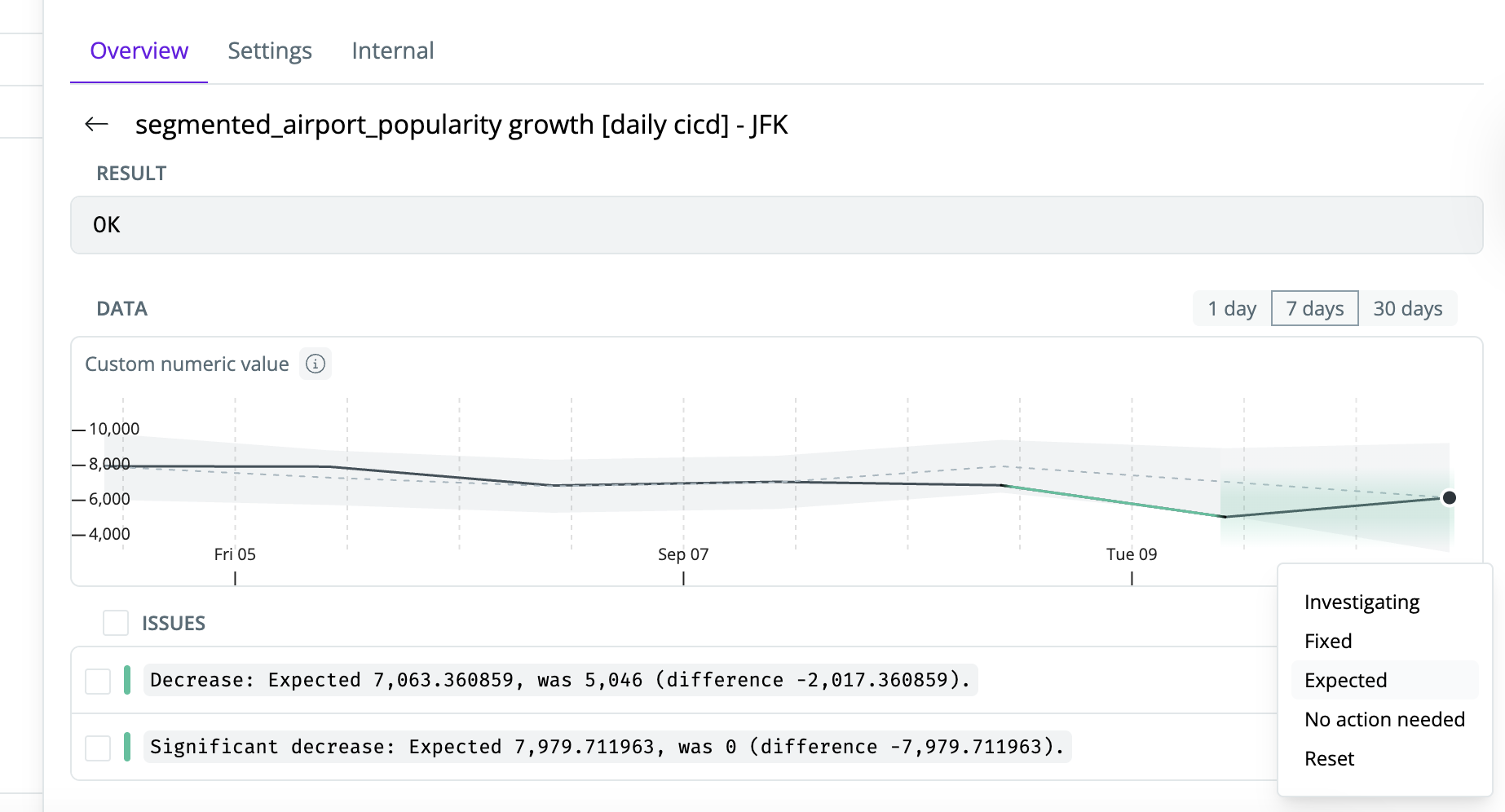 When you update the status of an issue, you can choose from five available statuses. Only **Expected** changes the behavior of the model; the other statuses are primarily informational for cross-team communication.
## Status Types
### **Investigating** (Informational)
Use when you or your team are actively looking into the issue.
* **Effect:** No change to the model.
* **Example:** You want to communicate that the issue is being worked on to avoid duplicate investigations by other team members.
### **Expected** (Model-Affecting)
Use when the new value was expected and should no longer be flagged as an anomaly.
* **Effect:** The anomaly will be added to the model's training dataset during the next update, and thresholds will adjust to prevent similar false positives in the future.
* **Example:** You increased a metric intentionally (e.g., a new product launch spiked signups).
### **Fixed** (Informational)
Use when you have taken action to resolve the underlying issue and expect the monitor to succeed on the next run.
* **Effect:** No change to the model. By default, the issue will remain flagged until it passes at the infrastructure level (monitor falls back within threshold, transformation layer test passes, etc.).
* **Example:** Missing events in a table were restored and you expect the next run to succeed.
> **Workspace Settings:**\
> If **Fixed** is enabled under *Workspace Settings → Resolved Issue Statuses*, the issue will be immediately removed from triage and moved to a non-error state — even if it is not yet resolved at the infrastructure level.\
> **Recommended:** Keep this **unchecked** so the issue stays in error state until technically resolved.
### **No Action Needed** (Informational)
Use when no action is required and the issue will resolve itself on the next run.
* **Effect:** No change to the model.
* **Example:** A temporary data delay that you know will catch up in the next scheduled run.
### **Reset**
Use to revert a previously set status (especially *Expected*) so that the issue returns to triage and can be investigated again.
* **Effect:** Any model adjustments made due to marking as *Expected* will be undone, ensuring the monitor continues to flag this type of anomaly.
* **Example:** You initially marked an anomaly as expected, but later discovered it was a genuine issue and want the monitor to detect it again.
## Marking Statuses
You can set or change a status directly from the monitor view:
* **Investigating** – Marks the issue as being worked on.
* **Mark as Expected** – Flags the anomaly as expected and updates thresholds.
* **Mark as Fixed** – Indicates the issue has been resolved manually.
* **Mark as No Action Needed** – Indicates the issue requires no action and will self-resolve.
* **Reset Status** – Clears any previously set status so the issue is treated as new.
## Workspace Settings: Resolved Issue Statuses
Under **Workspace Settings → Resolved Issue Statuses**, you can configure which statuses automatically remove issues from triage.
When you update the status of an issue, you can choose from five available statuses. Only **Expected** changes the behavior of the model; the other statuses are primarily informational for cross-team communication.
## Status Types
### **Investigating** (Informational)
Use when you or your team are actively looking into the issue.
* **Effect:** No change to the model.
* **Example:** You want to communicate that the issue is being worked on to avoid duplicate investigations by other team members.
### **Expected** (Model-Affecting)
Use when the new value was expected and should no longer be flagged as an anomaly.
* **Effect:** The anomaly will be added to the model's training dataset during the next update, and thresholds will adjust to prevent similar false positives in the future.
* **Example:** You increased a metric intentionally (e.g., a new product launch spiked signups).
### **Fixed** (Informational)
Use when you have taken action to resolve the underlying issue and expect the monitor to succeed on the next run.
* **Effect:** No change to the model. By default, the issue will remain flagged until it passes at the infrastructure level (monitor falls back within threshold, transformation layer test passes, etc.).
* **Example:** Missing events in a table were restored and you expect the next run to succeed.
> **Workspace Settings:**\
> If **Fixed** is enabled under *Workspace Settings → Resolved Issue Statuses*, the issue will be immediately removed from triage and moved to a non-error state — even if it is not yet resolved at the infrastructure level.\
> **Recommended:** Keep this **unchecked** so the issue stays in error state until technically resolved.
### **No Action Needed** (Informational)
Use when no action is required and the issue will resolve itself on the next run.
* **Effect:** No change to the model.
* **Example:** A temporary data delay that you know will catch up in the next scheduled run.
### **Reset**
Use to revert a previously set status (especially *Expected*) so that the issue returns to triage and can be investigated again.
* **Effect:** Any model adjustments made due to marking as *Expected* will be undone, ensuring the monitor continues to flag this type of anomaly.
* **Example:** You initially marked an anomaly as expected, but later discovered it was a genuine issue and want the monitor to detect it again.
## Marking Statuses
You can set or change a status directly from the monitor view:
* **Investigating** – Marks the issue as being worked on.
* **Mark as Expected** – Flags the anomaly as expected and updates thresholds.
* **Mark as Fixed** – Indicates the issue has been resolved manually.
* **Mark as No Action Needed** – Indicates the issue requires no action and will self-resolve.
* **Reset Status** – Clears any previously set status so the issue is treated as new.
## Workspace Settings: Resolved Issue Statuses
Under **Workspace Settings → Resolved Issue Statuses**, you can configure which statuses automatically remove issues from triage.
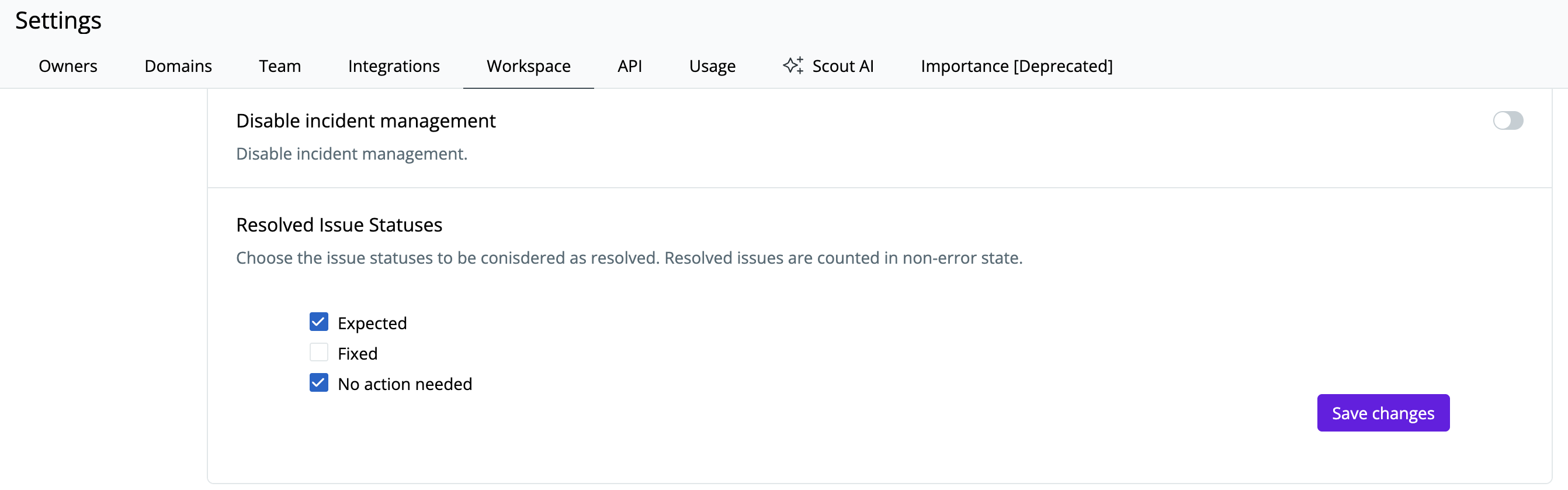 * **If checked:** The issue is immediately cleared from triage and marked non-error, regardless of whether the underlying infrastructure is still failing.
* **If unchecked (recommended for Fixed):** The issue will remain in error state until technically resolved (e.g., monitor passes, transformation layer test succeeds).
By combining **Expected** for model training with careful use of **Fixed**, **No Action Needed**, and **Investigating** for team communication, you can keep noise low while ensuring genuine issues are surfaced.
* **If checked:** The issue is immediately cleared from triage and marked non-error, regardless of whether the underlying infrastructure is still failing.
* **If unchecked (recommended for Fixed):** The issue will remain in error state until technically resolved (e.g., monitor passes, transformation layer test succeeds).
By combining **Expected** for model training with careful use of **Fixed**, **No Action Needed**, and **Investigating** for team communication, you can keep noise low while ensuring genuine issues are surfaced.