> ## Documentation Index
> Fetch the complete documentation index at: https://docs.synq.io/llms.txt
> Use this file to discover all available pages before exploring further.
# Snowflake
> Integrating Snowflake with Coalesce Quality
This guide will show you how to securely connect Coalesce Quality to your Snowflake instance.
We need this information so we collect metadata about your tables.
To be able to finish this guide, you’ll need the following:
→ Access to modify your Snowflake configuration as account admin
⏱️ Estimated time to finish: 10 minutes.
## Data we collect
We read metadata from your Snowflake account using the dedicated role described below. Depending on which features you enable in the integration, we ingest:
* **Catalog** — databases, schemas, tables, views, materialized views, dynamic tables, semantic views, streams, stages, comments, column types, tags.
* **SQL definitions** — `GET_DDL` output for tables, views, materialized views, dynamic tables, semantic views, streams, stored procedures, and user-defined functions. Used for lineage and to detect references between objects.
* **Constraints** — primary keys (via `SHOW PRIMARY KEYS`) and clustering keys. Foreign keys, uniques, and checks are read from `GET_DDL` when present.
* **Table metrics** *(opt-in)* — row counts and last-modified timestamps for anomaly detection.
* **Query logs** *(opt-in)* — `SNOWFLAKE.ACCOUNT_USAGE.QUERY_HISTORY` for performance, cost, and lineage signals.
* **Tasks** *(opt-in)* — `SHOW TASKS` plus `TASK_HISTORY` for execution outcomes.
* **Stored procedures and UDFs** — `SHOW PROCEDURES` / `SHOW USER FUNCTIONS` plus `GET_DDL` for SQL, JavaScript, Python, Java, and Scala languages (automatic when the role has `USAGE` on them).
* **Table-level lineage** *(opt-in)* — via `SNOWFLAKE.CORE.GET_LINEAGE` on Enterprise+ editions.
**Metadata vs. data access.** The baseline grants below give Coalesce Quality access to your **schema and DDL**, never to row data. The `SELECT` privileges on tables/views/etc. are required so the role can call `SHOW` and `GET_DDL` (Snowflake gates object visibility behind any object privilege), but Coalesce Quality only issues data-reading queries when you enable the corresponding opt-in feature in the integration UI — *Fetch table metrics*, *Fetch query logs*, *Fetch table lineage*, or SQL test execution against the audit table. With every opt-in disabled, the integration runs metadata commands only.
We use a dedicated XSMALL warehouse to isolate our workload from your production compute, and a dedicated user and role with the minimum required privileges. Metadata is collected on a schedule (typically every 30 minutes).
*This should be expected to consume \$0.0003 ([see warehouses overview](https://docs.snowflake.com/en/user-guide/warehouses-overview)) x 48 (every 30 minutes) x 10 (10s per check) = 0.14 credits per day.*
Before you execute your scripts you will need several key variables:
* `warehouse_name` — the name of the warehouse you will create (e.g. `SYNQ_WH`)
* `database_name` as an identifier of database (or multiple) you want to monitor
The following setup does several separate steps:
1. It creates a dedicated `username` and `role` for Coalesce Quality
2. It creates `xsmall` data warehouse that we can use to query your metadata
3. Grant necessary privileges to the dedicated user and role so we can pull query history and monitor the target database
## **Setup a user and warehouse**
As a super user, execute the following SQL commands to create a read-only role, a user assigned to that role, and a warehouse for that role.
We recommend creating a dedicated user name and warehouse.
### Password authentication
In the code, remember to replace:
* `` with a password that meets your account's [password policy](https://docs.snowflake.com/en/sql-reference/sql/create-password-policy)
* `` with the name you want the dedicated warehouse to have
```sql theme={null}
-- Configuration
set user_name='SYNQ';
set user_password='';
set warehouse_size='XSMALL';
set warehouse_name='';
set role_name='SYNQ';
-- Set role for grants
USE ROLE ACCOUNTADMIN;
-- Create warehouse for the monitoring workload
CREATE WAREHOUSE IF NOT EXISTS identifier($warehouse_name)
warehouse_size=$warehouse_size
auto_resume = true
auto_suspend = 60
initially_suspended=true
;
-- Create the dedicated role
CREATE ROLE IF NOT EXISTS identifier($role_name);
-- Create the dedicated user and grant access to role
CREATE USER IF NOT EXISTS identifier($user_name) PASSWORD=$user_password DEFAULT_ROLE=$role_name;
GRANT ROLE identifier($role_name) TO USER identifier($user_name);
-- Grant permissions to use the new warehouse
GRANT OPERATE, USAGE, MONITOR ON WAREHOUSE identifier($warehouse_name) TO ROLE identifier($role_name);
-- Grant privileges to allow access to query history
GRANT IMPORTED PRIVILEGES ON DATABASE "SNOWFLAKE" TO ROLE identifier($role_name);
```
### Key-pair authentication
For more details on Snowflake's key-pair authentication, see the [official Snowflake documentation](https://docs.snowflake.com/en/user-guide/key-pair-auth).
Coalesce Quality supports two key-pair authentication methods:
1. **Managed Key-pair**: The key pair is generated and managed for you
2. **User Managed Key-pair**: You generate and provide your own private key (supports both encrypted and unencrypted keys)
#### Option A: Managed Key-pair
When configuring the integration, select "Managed Key-pair" and a public key will be generated for you. Copy this public key and use it in the setup below.
In the code, remember to replace:
* `` with the key generated in the previous step
* `` with the name you want the dedicated warehouse to have
```sql theme={null}
-- Configuration
set user_name='SYNQ';
set rsa_public_key='';
set warehouse_size='XSMALL';
set warehouse_name='';
set role_name='SYNQ';
-- Set role for grants
USE ROLE ACCOUNTADMIN;
-- Create warehouse for the monitoring workload
CREATE WAREHOUSE IF NOT EXISTS identifier($warehouse_name)
warehouse_size=$warehouse_size
auto_resume = true
auto_suspend = 60
initially_suspended=true
;
-- Create the dedicated role
CREATE ROLE IF NOT EXISTS identifier($role_name);
-- Create the dedicated user and grant access to role
CREATE USER IF NOT EXISTS identifier($user_name) RSA_PUBLIC_KEY=$rsa_public_key DEFAULT_ROLE=$role_name;
GRANT ROLE identifier($role_name) TO USER identifier($user_name);
-- Grant permissions to use the new warehouse
GRANT OPERATE, USAGE, MONITOR ON WAREHOUSE identifier($warehouse_name) TO ROLE identifier($role_name);
-- Grant privileges to allow access to query history
GRANT IMPORTED PRIVILEGES ON DATABASE "SNOWFLAKE" TO ROLE identifier($role_name);
```
#### Option B: User Managed Key-pair
Both **encrypted** and **unencrypted** private keys in PKCS#8 PEM format are supported. If you use an encrypted key, you'll need to provide the passphrase when configuring the integration.
##### Generate a new key pair
Snowflake requires a minimum 2048-bit RSA private key in PKCS#8 PEM format.
**Generate an unencrypted private key:**
```bash theme={null}
openssl genrsa 2048 | openssl pkcs8 -topk8 -inform PEM -out rsa_key.p8 -nocrypt
```
**Generate an encrypted private key (recommended for better security):**
```bash theme={null}
openssl genrsa 2048 | openssl pkcs8 -topk8 -inform PEM -out rsa_key.p8
```
When prompted, enter a passphrase to encrypt the private key. You'll need to provide this passphrase when configuring the integration.
##### Extract the public key
After generating your private key, extract the public key:
```bash theme={null}
openssl rsa -in rsa_key.p8 -pubout -out rsa_key.pub
```
##### Configure Snowflake with your public key
Remove the header and footer from the public key file (`-----BEGIN PUBLIC KEY-----` and `-----END PUBLIC KEY-----`), then use the remaining content as `` in the setup script:
```sql theme={null}
-- Configuration
set user_name='SYNQ';
set rsa_public_key='';
set warehouse_size='XSMALL';
set warehouse_name='';
set role_name='SYNQ';
-- Set role for grants
USE ROLE ACCOUNTADMIN;
-- Create warehouse for the monitoring workload
CREATE WAREHOUSE IF NOT EXISTS identifier($warehouse_name)
warehouse_size=$warehouse_size
auto_resume = true
auto_suspend = 60
initially_suspended=true
;
-- Create the dedicated role
CREATE ROLE IF NOT EXISTS identifier($role_name);
-- Create the dedicated user and grant access to role
CREATE USER IF NOT EXISTS identifier($user_name) RSA_PUBLIC_KEY=$rsa_public_key DEFAULT_ROLE=$role_name;
GRANT ROLE identifier($role_name) TO USER identifier($user_name);
-- Grant permissions to use the new warehouse
GRANT OPERATE, USAGE, MONITOR ON WAREHOUSE identifier($warehouse_name) TO ROLE identifier($role_name);
-- Grant privileges to allow access to query history
GRANT IMPORTED PRIVILEGES ON DATABASE "SNOWFLAKE" TO ROLE identifier($role_name);
```
##### Configure the integration
In the integration settings:
1. Select "User Managed Key-pair" as the authentication method
2. Paste your **private key** (including the `-----BEGIN PRIVATE KEY-----` and `-----END PRIVATE KEY-----` headers)
3. If your key is encrypted (starts with `-----BEGIN ENCRYPTED PRIVATE KEY-----`), provide the passphrase
Keys in PKCS#1 format (`-----BEGIN RSA PRIVATE KEY-----`) are not supported by Snowflake. If you have a PKCS#1 key, convert it to PKCS#8 format using:
```bash theme={null}
openssl pkcs8 -topk8 -inform PEM -in rsa_key.pem -out rsa_key.p8 -nocrypt
```
## **Grant access to monitored database**
We recommend setting access on Schema level, as long as it is aligned with your permissions management strategy.
Applying schema level future grants in a Snowflake account where there are only database future grants can break existing roles! From [Snowflake's docs](https://docs.snowflake.com/en/sql-reference/sql/grant-privilege.html#considerations):
*"When future grants are defined at both the database and schema level, the schema level grants take precedence over the database level grants, and the database level grants are ignored. An important point to note here is that as long as there is a SCHEMA level future grants, ALL DATABASE levels will be ignored, even for the roles that are NOT defined in the SCHEMA level future grants."*
If you use schema grants follow Option 1, if you use database grants follow Option 2.
### Option 1 (Recommended): Grant access to all schemas
The following stored procedure iterates through each schema in a given database, then grants access to each table in a given schema. This stored procedure should be run as follows each time a new schema is created. Run it in the same Worksheet as the **Setup a user and warehouse** step above so the `$role_name` session variable is still set.
Replace `` with the name of your database.
```sql theme={null}
set database_name='';
-- Grant metadata privileges to database to be monitored
GRANT USAGE,MONITOR ON DATABASE identifier($database_name) TO ROLE identifier($role_name);
GRANT USAGE,MONITOR ON ALL SCHEMAS IN DATABASE identifier($database_name) TO ROLE identifier($role_name);
GRANT USAGE,MONITOR ON FUTURE SCHEMAS IN DATABASE identifier($database_name) TO ROLE identifier($role_name);
USE DATABASE identifier($database_name);
CREATE OR REPLACE PROCEDURE grantFutureAccess(databaseName string, roleName string)
returns string not null
language javascript
as
$$
var schemaResultSet = snowflake.execute({ sqlText: 'SELECT SCHEMA_NAME FROM ' + DATABASENAME + ".INFORMATION_SCHEMA.SCHEMATA WHERE SCHEMA_NAME != 'INFORMATION_SCHEMA';"});
var numberOfSchemasGranted = 0;
while (schemaResultSet.next()) {
numberOfSchemasGranted += 1;
var schemaAndRoleSuffix = ' in schema ' + DATABASENAME + '."' +
schemaResultSet.getColumnValue('SCHEMA_NAME') + '" to role ' + ROLENAME + ';'
snowflake.execute({ sqlText: 'grant USAGE on schema ' + DATABASENAME + '."' +
schemaResultSet.getColumnValue('SCHEMA_NAME') + '" to role ' + ROLENAME + ';'});
snowflake.execute({ sqlText: 'grant SELECT on all tables' + schemaAndRoleSuffix});
snowflake.execute({ sqlText: 'grant SELECT on all views' + schemaAndRoleSuffix});
snowflake.execute({ sqlText: 'grant SELECT on all materialized views' + schemaAndRoleSuffix});
snowflake.execute({ sqlText: 'grant SELECT on all dynamic tables' + schemaAndRoleSuffix});
snowflake.execute({ sqlText: 'grant SELECT on all streams' + schemaAndRoleSuffix});
snowflake.execute({ sqlText: 'grant SELECT on all semantic views' + schemaAndRoleSuffix});
snowflake.execute({ sqlText: 'grant REFERENCES on all semantic views' + schemaAndRoleSuffix});
snowflake.execute({ sqlText: 'grant USAGE on all procedures' + schemaAndRoleSuffix});
snowflake.execute({ sqlText: 'grant USAGE on all functions' + schemaAndRoleSuffix});
snowflake.execute({ sqlText: 'grant SELECT on future tables' + schemaAndRoleSuffix});
snowflake.execute({ sqlText: 'grant SELECT on future views' + schemaAndRoleSuffix});
snowflake.execute({ sqlText: 'grant SELECT on future materialized views' + schemaAndRoleSuffix});
snowflake.execute({ sqlText: 'grant SELECT on future dynamic tables' + schemaAndRoleSuffix});
snowflake.execute({ sqlText: 'grant SELECT on future streams' + schemaAndRoleSuffix});
snowflake.execute({ sqlText: 'grant SELECT on future semantic views' + schemaAndRoleSuffix});
snowflake.execute({ sqlText: 'grant REFERENCES on future semantic views' + schemaAndRoleSuffix});
snowflake.execute({ sqlText: 'grant USAGE on future procedures' + schemaAndRoleSuffix});
snowflake.execute({ sqlText: 'grant USAGE on future functions' + schemaAndRoleSuffix});
}
return 'Granted access to ' + numberOfSchemasGranted + ' schemas';
$$
;
grant USAGE on database identifier($database_name) to role identifier($role_name);
call grantFutureAccess($database_name, $role_name);
```
`MATERIALIZED VIEW`, `STREAM`, and `SELECT ON DYNAMIC TABLE` grants are silently ignored on Snowflake editions that do not support those object types — the `grant` statements still succeed, so the procedure is safe to run on Standard edition.
**Semantic views need both `SELECT` and `REFERENCES`.** `SELECT` lets the role list them via `SHOW SEMANTIC VIEWS` and query them via `SEMANTIC_VIEW(sv DIMENSIONS … METRICS …)`. `REFERENCES` is required separately so `GET_DDL('SEMANTIC_VIEW', …)` returns the body — without it, the catalog scrape can see the asset but cannot read its definition. Snowflake gates this differently from every other object kind, where `SELECT` / `USAGE` cover both visibility and `GET_DDL`.
### Option 2: Grant access to a database
Run this in the same Worksheet as the **Setup a user and warehouse** step above.
Replace `` with the name of your database.
```sql theme={null}
set database_name='';
-- Read-only access to database
grant USAGE, MONITOR on database identifier($database_name) to role identifier($role_name);
grant USAGE, MONITOR on all schemas in database identifier($database_name) to role identifier($role_name);
grant USAGE, MONITOR on future schemas in database identifier($database_name) to role identifier($role_name);
grant SELECT on all tables in database identifier($database_name) to role identifier($role_name);
grant SELECT on future tables in database identifier($database_name) to role identifier($role_name);
grant SELECT on all views in database identifier($database_name) to role identifier($role_name);
grant SELECT on future views in database identifier($database_name) to role identifier($role_name);
grant SELECT on all materialized views in database identifier($database_name) to role identifier($role_name);
grant SELECT on future materialized views in database identifier($database_name) to role identifier($role_name);
grant SELECT on all dynamic tables in database identifier($database_name) to role identifier($role_name);
grant SELECT on future dynamic tables in database identifier($database_name) to role identifier($role_name);
grant SELECT on all streams in database identifier($database_name) to role identifier($role_name);
grant SELECT on future streams in database identifier($database_name) to role identifier($role_name);
-- Semantic views: SELECT enables SHOW + SEMANTIC_VIEW(...) querying;
-- REFERENCES is required separately for GET_DDL('SEMANTIC_VIEW', ...).
grant SELECT on all semantic views in database identifier($database_name) to role identifier($role_name);
grant SELECT on future semantic views in database identifier($database_name) to role identifier($role_name);
grant REFERENCES on all semantic views in database identifier($database_name) to role identifier($role_name);
grant REFERENCES on future semantic views in database identifier($database_name) to role identifier($role_name);
grant USAGE on all procedures in database identifier($database_name) to role identifier($role_name);
grant USAGE on future procedures in database identifier($database_name) to role identifier($role_name);
grant USAGE on all functions in database identifier($database_name) to role identifier($role_name);
grant USAGE on future functions in database identifier($database_name) to role identifier($role_name);
```
## **Grant access to Snowflake tasks (Optional)**
If you want to monitor Snowflake tasks, you need to grant MONITOR privileges on the specific tasks you want to observe. This allows us to collect task execution history and metadata.
Replace ``, ``, and `` with your actual database, schema, and task names before running:
```sql theme={null}
-- Grant MONITOR privilege on a specific task
GRANT MONITOR ON TASK .. TO ROLE identifier($role_name);
-- To grant MONITOR on all tasks in a schema (if needed)
GRANT MONITOR ON ALL TASKS IN SCHEMA . TO ROLE identifier($role_name);
-- To grant MONITOR on future tasks in a schema (if needed)
GRANT MONITOR ON FUTURE TASKS IN SCHEMA . TO ROLE identifier($role_name);
```
The MONITOR privilege on tasks allows viewing task execution history, status, and metadata but does not allow executing or modifying the tasks. This is required for task monitoring and anomaly detection.
After granting these privileges, you must also enable task monitoring in the integration settings. In the integration configuration screen, make sure to enable "Fetch tasks and their executions" to start collecting task data.
## **Grant access to Snowflake tags (Optional)**
If your Snowflake objects use [tags](https://docs.snowflake.com/en/user-guide/object-tagging) and you want Coalesce Quality to read them (e.g. to filter tables or deploy monitors based on tag values), you need to grant the `APPLY TAG` privilege. Without this privilege, Snowflake's [`GET_DDL`](https://docs.snowflake.com/en/sql-reference/functions/get_ddl#usage-notes) function replaces tag names and values with `#UNKNOWN_TAG='#UNKNOWN_VALUE'` placeholders.
```sql theme={null}
-- Grant ability to read tags from GET_DDL output
GRANT APPLY TAG ON ACCOUNT TO ROLE identifier($role_name);
```
This grant is only needed if you use Snowflake tags on your tables/views and want Coalesce Quality to use them for filtering or monitor rules. Coalesce Quality will show a warning during ingestion if it detects unknown tag placeholders in your metadata, so you can decide at that point whether to apply this grant.
The `APPLY TAG` privilege allows reading tag assignments but does not grant the ability to modify data or other security policies. See the [Snowflake GET\_DDL documentation](https://docs.snowflake.com/en/sql-reference/functions/get_ddl#usage-notes) for more details.
## **Stored procedures and user-defined functions**
Coalesce Quality automatically discovers stored procedures and UDFs using `SHOW PROCEDURES IN DATABASE` / `SHOW USER FUNCTIONS IN DATABASE` and fetches each object's DDL via `GET_DDL`. All languages are supported (SQL, JavaScript, Python, Java, Scala). The grants in Option 1 / Option 2 above already include the required `USAGE` on procedures and functions — no extra steps are needed.
Procedures and UDFs show up as first-class assets in Coalesce Quality and participate in lineage whenever they are referenced by tables, views, or tasks.
## Personal access (user OAuth)
In addition to the workspace credentials above, you can let each Coalesce Quality member authenticate as themselves against Snowflake. Queries then run under the member's own Snowflake account and respect the grants, masking policies, and row-level security configured on that user. See [Data Warehouse Access](/security/dwh-access) for the full model and when to enable it.
To enable personal access, an account admin creates a Snowflake security integration of type `OAUTH` once, then pastes the client ID and secret into the Snowflake integration's edit page in Coalesce Quality.
### Create the security integration
```sql theme={null}
USE ROLE ACCOUNTADMIN;
CREATE SECURITY INTEGRATION COALESCE_QUALITY_USER_OAUTH
TYPE = OAUTH
ENABLED = TRUE
OAUTH_CLIENT = CUSTOM
OAUTH_CLIENT_TYPE = 'CONFIDENTIAL'
OAUTH_REDIRECT_URI = 'https://app.synq.io/auth/dwh-oauth/callback'
OAUTH_ALTERNATE_REDIRECT_URIS = ('https://app.us.synq.io/auth/dwh-oauth/callback')
OAUTH_ISSUE_REFRESH_TOKENS = TRUE
OAUTH_REFRESH_TOKEN_VALIDITY = 7776000 -- 90 days
BLOCKED_ROLES_LIST = ('ACCOUNTADMIN','ORGADMIN','SECURITYADMIN');
```
Keep only the redirect URI(s) for the Coalesce Quality region(s) your members use. The EU app is `https://app.synq.io`, the US app is `https://app.us.synq.io` — pass one as `OAUTH_REDIRECT_URI` and the other (if applicable) in `OAUTH_ALTERNATE_REDIRECT_URIS`. No trailing slash.
`BLOCKED_ROLES_LIST` prevents members from minting OAuth tokens for high-privilege account roles. Add any other roles your security policy reserves for break-glass use.
### Fetch the client credentials
```sql theme={null}
SELECT SYSTEM$SHOW_OAUTH_CLIENT_SECRETS('COALESCE_QUALITY_USER_OAUTH');
```
The function returns a JSON object with `OAUTH_CLIENT_ID`, `OAUTH_CLIENT_SECRET`, and `OAUTH_CLIENT_SECRET_2` (the second secret exists for rotation; either can be used). Paste the client ID and one of the secrets into Settings → Integrations → *(your Snowflake integration)* → Warehouse access → Personal credentials in Coalesce Quality.
No user mapping is required. When a member consents, they sign in to Snowflake on the standard authorize page, and the access token is issued for that Snowflake user. If your account uses SSO/SAML, the consent page transparently redirects through the IdP. Coalesce Quality stores per-user access/refresh tokens; queries from that member then run as the Snowflake user they signed in as.
### Optional: restrict which roles members can request
Each member can pass a `role` parameter when consenting (Coalesce Quality forwards it as `scope=session:role:`). If you want to constrain the set of roles reachable through this OAuth app, use `ALLOWED_ROLES_LIST`:
```sql theme={null}
ALTER SECURITY INTEGRATION COALESCE_QUALITY_USER_OAUTH
SET ALLOWED_ROLES_LIST = ('ANALYST', 'READER');
```
`ALLOWED_ROLES_LIST` is a whitelist that complements `BLOCKED_ROLES_LIST` (blacklist) above. Leave it empty to allow any role the member is granted on Snowflake, minus the blocked ones.
## Network Configuration
If your Snowflake instance is behind a firewall or has network access controls, you may need to whitelist our IP addresses. See [IP Whitelist](/security/ip) for the complete list of IP addresses by region.
Once you've successfully created the warehouse, database, and dedicated role, input the following data in the Coalesce Quality UI.
## Input data in the UI
### Integration name
For example, `snowflake`
### Account name
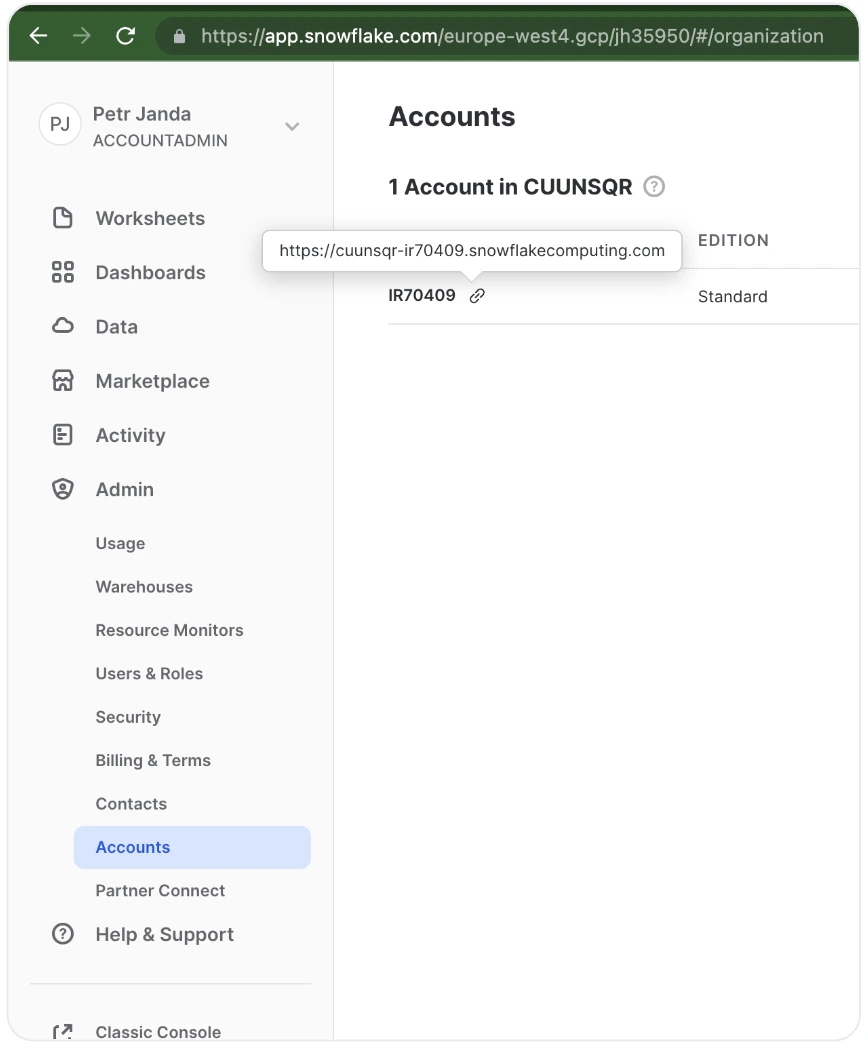
You can find it under `Admin` > `Accounts` when you highlight the link icon (🔗). Both formats work:
* `-` (preferred, e.g. `acme-prod1`)
* `.` (legacy, e.g. `xy12345.eu-west-1`)
Do **not** include `https://` or a trailing slash. A trailing `.snowflakecomputing.com` is stripped and the value is lowercased automatically, so either `acme-prod1` or `acme-prod1.snowflakecomputing.com` will work.
 ### Databases
The names of the databases you granted access to earlier in the guide. You can monitor multiple databases with the same integration.
### Role, username, and password
The role name, username, and password you created earlier in the guide.
### Warehouse
The name of the warehouse you created earlier in the guide.
### Audit table FQN (optional)
Fully-qualified table name (e.g. `MY_DB.PUBLIC.SYNQ_AUDIT`) where Coalesce Quality will write SQL test execution results. The integration creates the table automatically if it does not yet exist. Leave empty if you do not run SQL tests.
### ACCOUNT\_USAGE database name (optional)
Defaults to `SNOWFLAKE`. Override only if your account has the `SNOWFLAKE` share imported under a non-default name.
### Optional flags
* **Fetch query logs** — enables query history ingestion from `SNOWFLAKE.ACCOUNT_USAGE.QUERY_HISTORY`. You can optionally restrict the set of source databases.
* **Fetch Snowflake tasks** — discovers Snowflake Tasks (`SHOW TASKS`). Select a subset of databases or leave empty for all.
* **Fetch task executions from `ACCOUNT_USAGE.TASK_HISTORY`** — when on, centralized task history is used (up to 45-minute lag). When off, `INFORMATION_SCHEMA.TASK_HISTORY` is queried per database (lower lag, more warehouse time).
* **Task execution fetch interval (minutes)** — minimum 5.
* **Fetch table lineage** — uses `SNOWFLAKE.CORE.GET_LINEAGE` for table-level lineage (Enterprise+). Optionally restrict to a subset of databases.
* **Don't use GET\_DDL for table schema collection** — enable only if `GET_DDL` causes warehouse pressure; Coalesce Quality will fall back to parsing query logs.
### Databases
The names of the databases you granted access to earlier in the guide. You can monitor multiple databases with the same integration.
### Role, username, and password
The role name, username, and password you created earlier in the guide.
### Warehouse
The name of the warehouse you created earlier in the guide.
### Audit table FQN (optional)
Fully-qualified table name (e.g. `MY_DB.PUBLIC.SYNQ_AUDIT`) where Coalesce Quality will write SQL test execution results. The integration creates the table automatically if it does not yet exist. Leave empty if you do not run SQL tests.
### ACCOUNT\_USAGE database name (optional)
Defaults to `SNOWFLAKE`. Override only if your account has the `SNOWFLAKE` share imported under a non-default name.
### Optional flags
* **Fetch query logs** — enables query history ingestion from `SNOWFLAKE.ACCOUNT_USAGE.QUERY_HISTORY`. You can optionally restrict the set of source databases.
* **Fetch Snowflake tasks** — discovers Snowflake Tasks (`SHOW TASKS`). Select a subset of databases or leave empty for all.
* **Fetch task executions from `ACCOUNT_USAGE.TASK_HISTORY`** — when on, centralized task history is used (up to 45-minute lag). When off, `INFORMATION_SCHEMA.TASK_HISTORY` is queried per database (lower lag, more warehouse time).
* **Task execution fetch interval (minutes)** — minimum 5.
* **Fetch table lineage** — uses `SNOWFLAKE.CORE.GET_LINEAGE` for table-level lineage (Enterprise+). Optionally restrict to a subset of databases.
* **Don't use GET\_DDL for table schema collection** — enable only if `GET_DDL` causes warehouse pressure; Coalesce Quality will fall back to parsing query logs.