> ## Documentation Index
> Fetch the complete documentation index at: https://docs.synq.io/llms.txt
> Use this file to discover all available pages before exploring further.
# Data products overview
> Coalesce Quality enables you to deploy relevant monitors, track uptime, and manage ownership of your business-critical data assets through Data Products
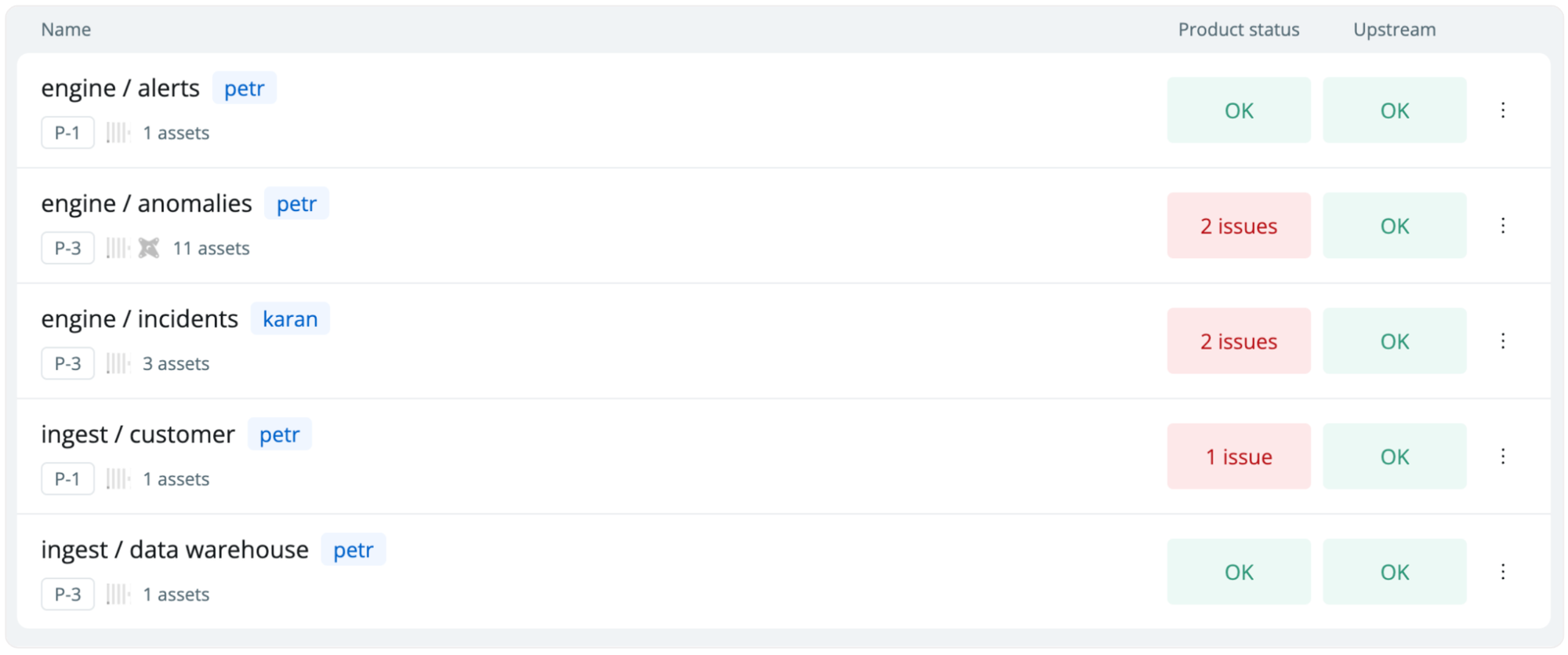
You should consider data products based on downstream use cases of your most important data. By setting up data products, you can head to `Products` for a complete overview of your products and their status.
*Data products showing the priority, owner, and status of all monitors and tests*
 *Examples of data products are*
A set of transformation models and metrics within a specific folder, like a finance mart (e.g., dbt models, SQLMesh models, or Coalesce nodes).
A group of transformation models linked by an exposure, for instance, models used by a CLTV model that powers marketing automation.
A selected collection of dashboards in a BI tool, such as core KPI reporting.
A compilation of tables or transformation models that carry a common tag, like all 'P1' models that require high-priority management.
### Benefits of creating data products
Data products give you an easy way to manage the end reliability of your business-critical data.
* **Understand end-end health**—understand all monitors and tests on the data product and its upstream dependencies.
* **Set relevant monitors**—one-click monitor setup based on your data product definitions.
* **Define and activate ownership**—manage ownership and alerting on the data product level.
* **Communicate uptime & SLAs**—see historical issues and share insights around quality scores and test coverage of the data product.
### Understanding a data product
Data products are simple on the surface but complex under the hood. The key concepts to understand around a data product are `lineage`, `assets`, `definitions`, `historical uptime`, `product health`, and `upstream health`.
A Data Product has four sections:
1. **Overview**-key information about the data product assets, current status, and health over the past 15 days.
2. **Issues**-list all the issues that are currently affecting your data product.
3. **Lineage**-the relationships between your product's assets.
4. **Settings**-modify your product's name, alert settings, owner, and assets.
*Examples of data products are*
A set of transformation models and metrics within a specific folder, like a finance mart (e.g., dbt models, SQLMesh models, or Coalesce nodes).
A group of transformation models linked by an exposure, for instance, models used by a CLTV model that powers marketing automation.
A selected collection of dashboards in a BI tool, such as core KPI reporting.
A compilation of tables or transformation models that carry a common tag, like all 'P1' models that require high-priority management.
### Benefits of creating data products
Data products give you an easy way to manage the end reliability of your business-critical data.
* **Understand end-end health**—understand all monitors and tests on the data product and its upstream dependencies.
* **Set relevant monitors**—one-click monitor setup based on your data product definitions.
* **Define and activate ownership**—manage ownership and alerting on the data product level.
* **Communicate uptime & SLAs**—see historical issues and share insights around quality scores and test coverage of the data product.
### Understanding a data product
Data products are simple on the surface but complex under the hood. The key concepts to understand around a data product are `lineage`, `assets`, `definitions`, `historical uptime`, `product health`, and `upstream health`.
A Data Product has four sections:
1. **Overview**-key information about the data product assets, current status, and health over the past 15 days.
2. **Issues**-list all the issues that are currently affecting your data product.
3. **Lineage**-the relationships between your product's assets.
4. **Settings**-modify your product's name, alert settings, owner, and assets.
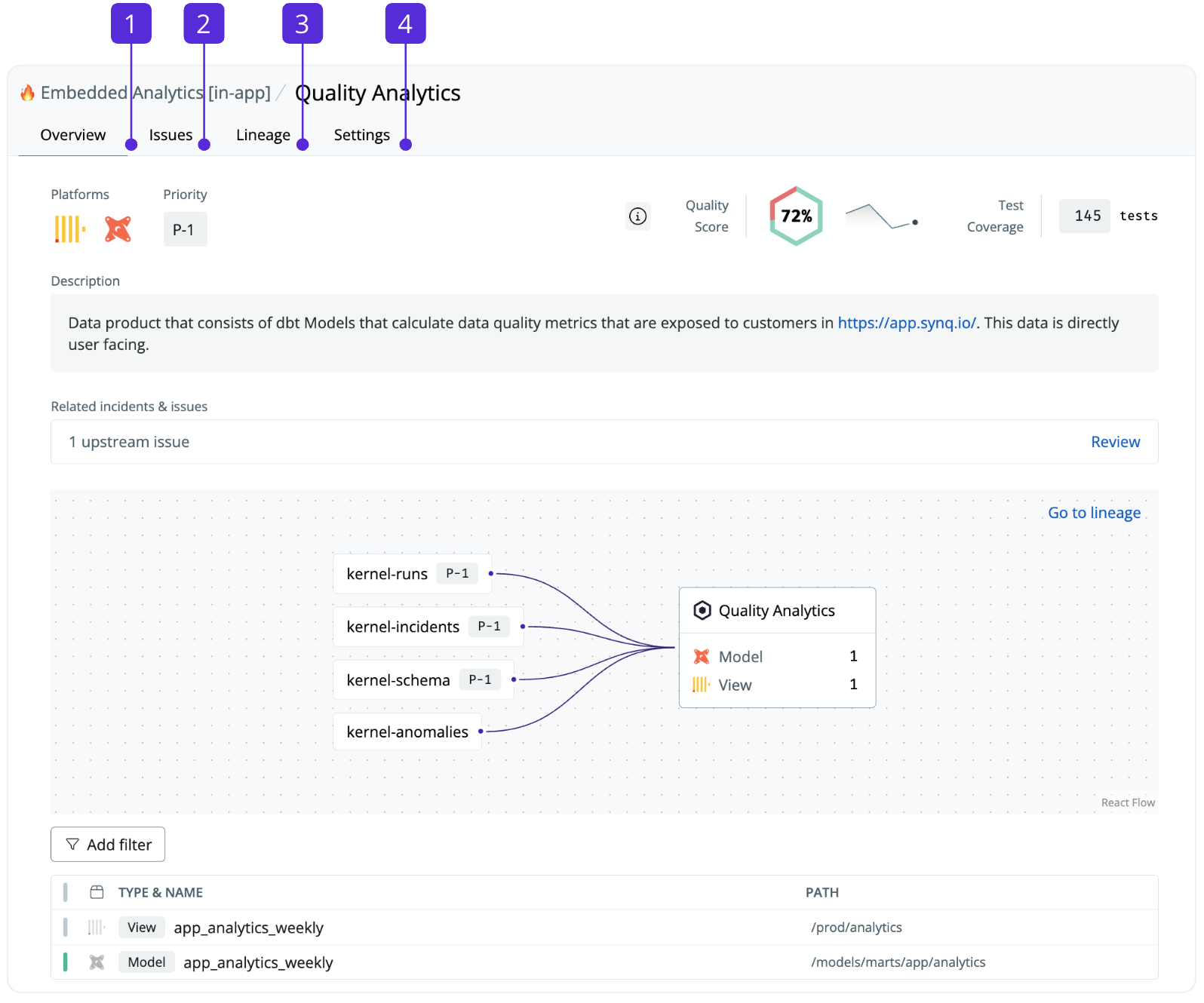 Data Product overview:
* **Summary**—platforms, priority, description, and a summary of the quality score and coverage
* **Related incidents & issues**—shows all issues and incidents on or upstream of the data product
* **Lineage**—data assets and data products up and downstream of the data product
* **Assets**—all data assets that are part of the data product definition
### Creating a data product
1. Go to [Creating a data product](/data-products/creating-a-data-product)
### Modifying or deleting a data product
1. Navigate to [Products](https://app.synq.io/products)
2. Click the three dots for the data product you want to modify and select `Settings` to edit it or `Delete` to delete it.
Data Product overview:
* **Summary**—platforms, priority, description, and a summary of the quality score and coverage
* **Related incidents & issues**—shows all issues and incidents on or upstream of the data product
* **Lineage**—data assets and data products up and downstream of the data product
* **Assets**—all data assets that are part of the data product definition
### Creating a data product
1. Go to [Creating a data product](/data-products/creating-a-data-product)
### Modifying or deleting a data product
1. Navigate to [Products](https://app.synq.io/products)
2. Click the three dots for the data product you want to modify and select `Settings` to edit it or `Delete` to delete it.